

Next Flight Out (NFO)
Plan the complete NFO route
Next Flight Out (NFO) combines the ground work at origin, the air leg, and recovery/delivery at destination. Confirm cargo readiness, tender cutoffs, airport handoff requirements, and recovery arrangements with the people performing the work. The earliest scheduled departure is not a guarantee the airline can accept the shipment.
Build the shipment
Start an order draft and add ground, flight, and ground segments in Timeline. Add cargo, then enter the pickup, airline tender, airline recovery, and delivery details on the appropriate tasks. Assign the ground executor for each side of the journey. See Multi-Leg Orders.
Select or record flight information
Open the flight segment’s setup. Review the itinerary’s origin, destination, dates, and flight identifiers. When your team has already arranged transport, record the existing booking rather than assuming attaching a flight purchases cargo capacity. For new cargo bookings, use the air-cargo workflow your organization supports.
Check flight progress
Review flight status and milestones in the order Timeline. Keep scheduled flight times, observed flight updates, and cargo handoff proof distinct. Review task artifacts for tender and recovery alongside the flight information. An arrival update does not confirm the cargo has been recovered.
Select the flight segment on the Timeline to open its Flight leg panel. It shows the flight’s status 1, here In Flight, the Takeoff 2 and Landing 3 cards with the actual or estimated time in each airport’s time zone and any delay, the departure gate 4 and a map with the aircraft 5.
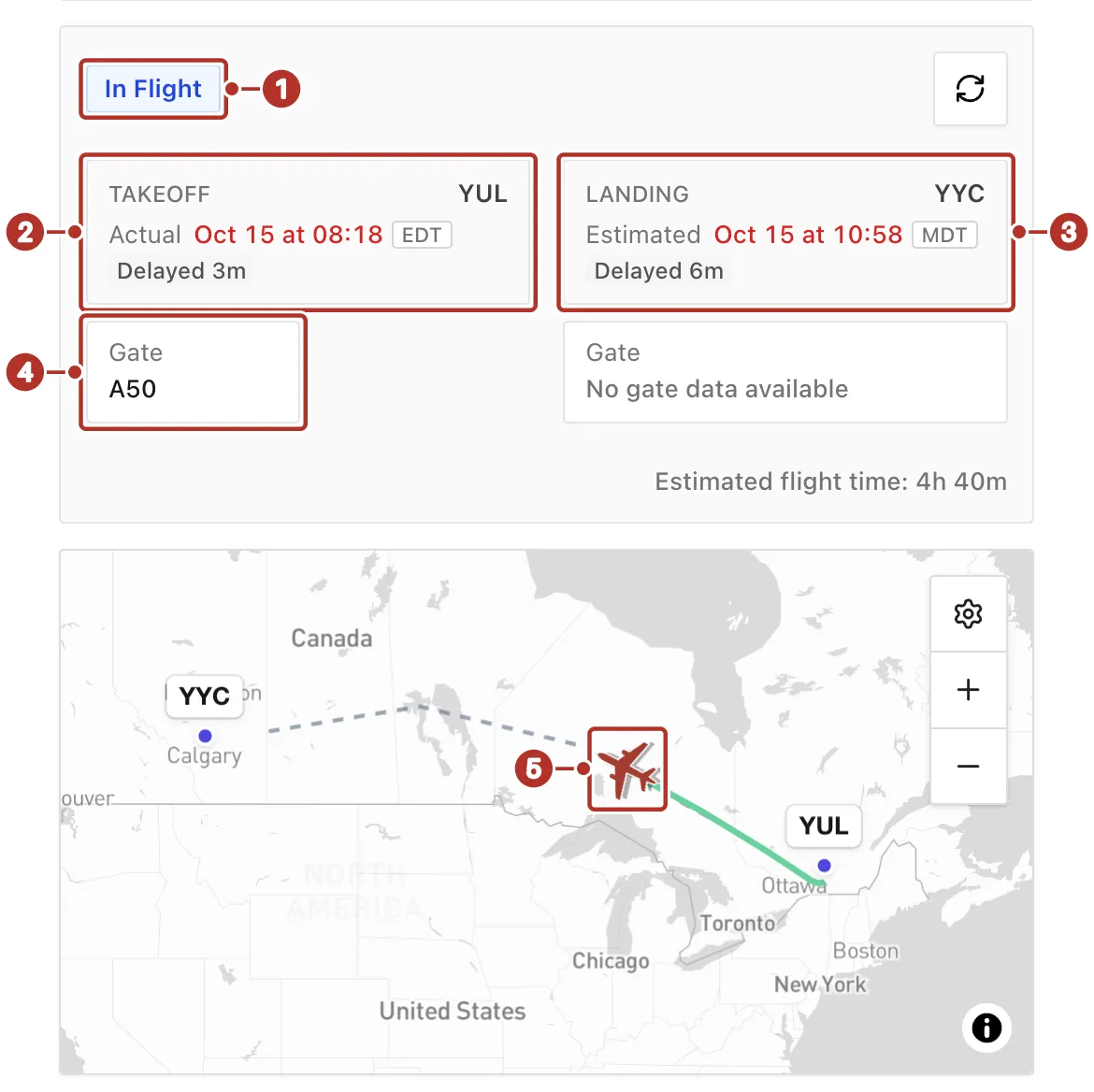
The Flight leg panel for a flight in progress, with its map. 1 In Flight status, 2 Takeoff card, 3 Landing card, 4 Gate card, 5 aircraft on the map.
Add cargo and proof requirements
Use Cargo to enter the items moving on this shipment. Add cargo creates a row immediately, and grid edits submit automatically; reopen Cargo to confirm the saved values. Check the cargo assigned to each pickup, handoff, and delivery. Add task artifacts where proof is needed: images, files, signatures, scans, or other evidence. A proof requirement and a completed proof are different; inspect the saved artifact on the task after execution.
Review and stage
Review Summary, Timeline, and Cargo before choosing Stage order. Resolve the issues reported by the workspace. After staging, reload the order and confirm its saved state and assignments. Staging an order is separate from assigning a driver, starting a segment, or completing a stop.
Start a multi-leg draft
NFO often has small, urgent freight (documents, organs, parts) — get dimensions and weight in for proper handling and pricing.