

Trackers for International Cargo
Choose the source for the leg
Use tracking sources to distinguish cargo position from a driver’s phone location. The map can offer Driver, Cargo (Driver), and Cargo with Device, alongside integration-specific sources when present. Check the source label and update time before interpreting a marker. An onboard courier’s Driver route line breaks across a flight, from boarding until deboarding.
Coordinate tracker setup
Agree which physical device will travel with which cargo and who will register, attach, recover, and maintain it. An operator or higher links a device to cargo from the Tracking column of the order’s Cargo grid or from Actions > Add tracking devices, and a device can track one cargo at a time. Use Trackers on Orders and Supported Devices for the relevant device workflow. Check device-specific operating and airline requirements with your team before tender.
Inspect order tracking
Open the order Summary or Timeline map and select the intended segment and available device source. Inspect its latest report and any historical data provided. A flight status, driver report, and device observation are separate sources; compare their timestamps before drawing a conclusion.
The Map settings gear 1 lists the sources on the order map, such as Driver 2 and Cargo (Driver) 3, with See all pings 4 and a Progress | Live switch 5.
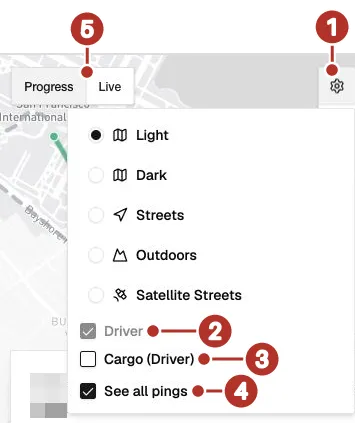
Order map settings in the shipper view. 1 Map settings gear, 2 Driver (on, and dimmed because it is the only source shown), 3 Cargo (Driver) (off), 4 See all pings (on), 5 Progress | Live switch. Look at 2 and 3 to see which sources the map is showing.
Read condition data only when provided
Review the measurements available for the actual device/integration. Do not expect every tracker to provide temperature, humidity, shock, light, or other condition readings. Missing readings need a device/integration check, not an assumption the cargo is within range.
Share the intended information
Use the order sharing settings to select the tracking sources intended for the recipient. Inspect the signed-out public page before sharing it. Use Public Tracking Links for the access check and keep standalone-session sharing separate.