

Supported Devices
Chrt’s device controls use Tag and Label as device type labels. Connected-service devices, driver tracking, and Chrt device sessions appear through different records and views. Choose the record that matches your tracking source, then confirm the actual hardware model and its capabilities.
Device records in Chrt
Open Devices to review the devices available to your organization. Register Device 1 opens the registration form, and an organization with none shows No devices match your filters 2.
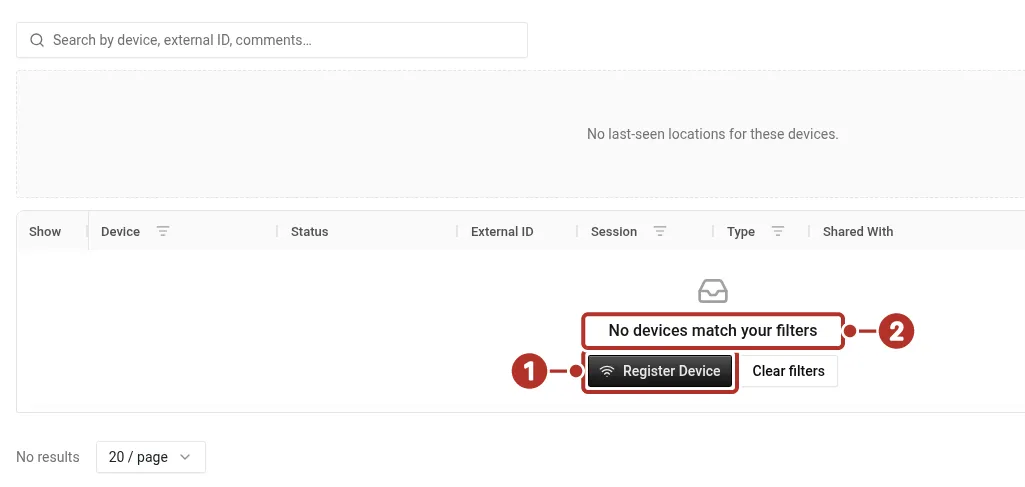
The Devices page of an organization with no devices. An empty list says nothing about an organization’s hardware inventory. 1 Register Device, 2 No devices match your filters.
The Register Device form includes Device MAC Address 1 and an optional Device Type 2. Its type choices include Tag and Label.
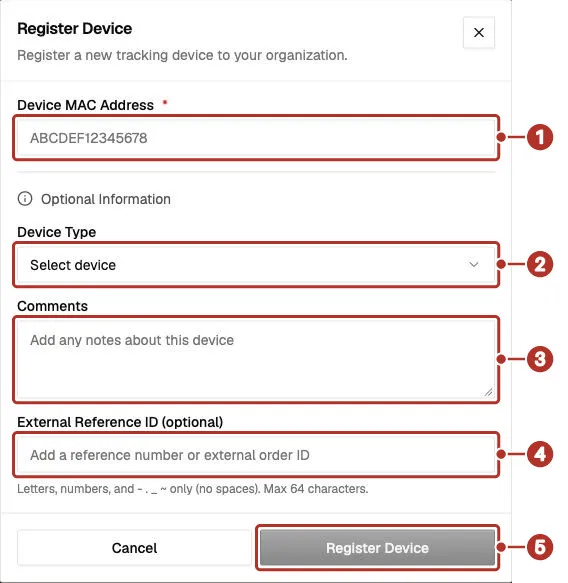
The Register Device dialog on the Devices page, blank. 1 Device MAC Address (required); under Optional Information, 2 Device Type, 3 Comments, 4 External Reference ID, 5 Register Device, disabled while the form is blank.
The form shows a blank Device MAC Address 1 field with an example placeholder, Device Type 2 displaying Select device, Comments 3, and optional External Reference ID 4. Register Device 5 is disabled.
The current type choices map Tag to T3-D-tag and Label to MTB06-label. These are labels used to identify a device record. They do not specify battery duration, rechargeability, sensor accuracy, or the readings available on every device.
Open a device record to review its MAC address, Device Type 1, optional External ID 2, Registered 3 time, and Last Seen 4 information when available. Dates are spelled out with the month name and time zone. When the device has a reported location, a Last Seen Location map appears. An Active Cargo section shows the cargo the device is linked to, with an Unlink button for operators or higher in the organization that owns the device. Confirm that the identifier matches the device you intend to use. A saved device record and a reported location are separate checks.
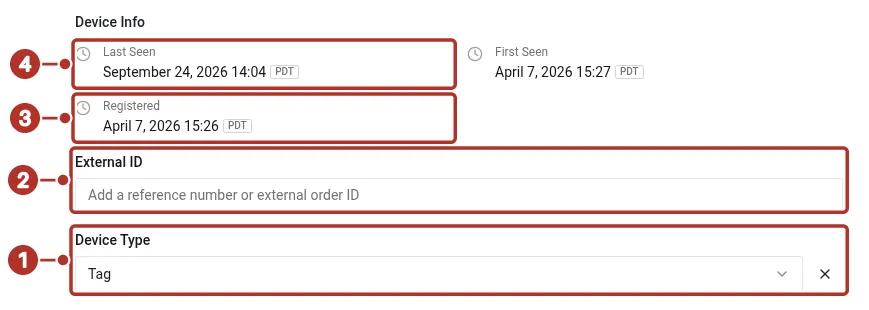
The Device Info section of a device record for a Tag. 1 Device Type, 2 External ID, 3 Registered, 4 Last Seen.
Archive is disabled while the device is linked to cargo (“Unlink this device from its cargo before archiving.”) or has an active session (“End this device’s tracking session before archiving.”). In the device list, a device linked to cargo shows the order reference as a link.
Other tracking sources
For a hand-carry shipment, confirm which source will follow the cargo for each leg. An onboard courier is part of the shipment operation; it is not a hardware specification. Do not assume that a driver source and a cargo device provide the same location or condition data.
Confirm suitability before use
Tell trackers@chrt.com the device model, shipment duration, transport legs, and readings you need. Confirm compatibility, mounting and handling requirements, battery expectations, and any required setup using the guidance for that model. Hardware setup procedures are being validated separately from this overview.
chrt does not sell trackers self-serve. To request Tive devices, email trackers@chrt.com with the type and quantity you need. See chrt.com/trackers for the marketing overview of available hardware.
Related guides
- Battery and data — read available telemetry.
- Standalone trackers — device and session controls.
- Trackers on orders — map sources for a shipment.
- Integrations — connected tracking services.