

Integrations
Chrt has tracking pages for Tive and Reelables records. Use the service page that matches your tracking source. Access to a page or an empty list does not establish that an account is connected or that a shipment has been imported.
Find the service records
The Tive area offers Shipments and Devices tabs. Reelables has an Assets view. Chrt-native device records are on Devices, separate from these service records.
The Tive area opens on the Shipments and Devices tabs 1 with a table of columns 2; an organization with no Tive data shows No Tive shipments available 3.
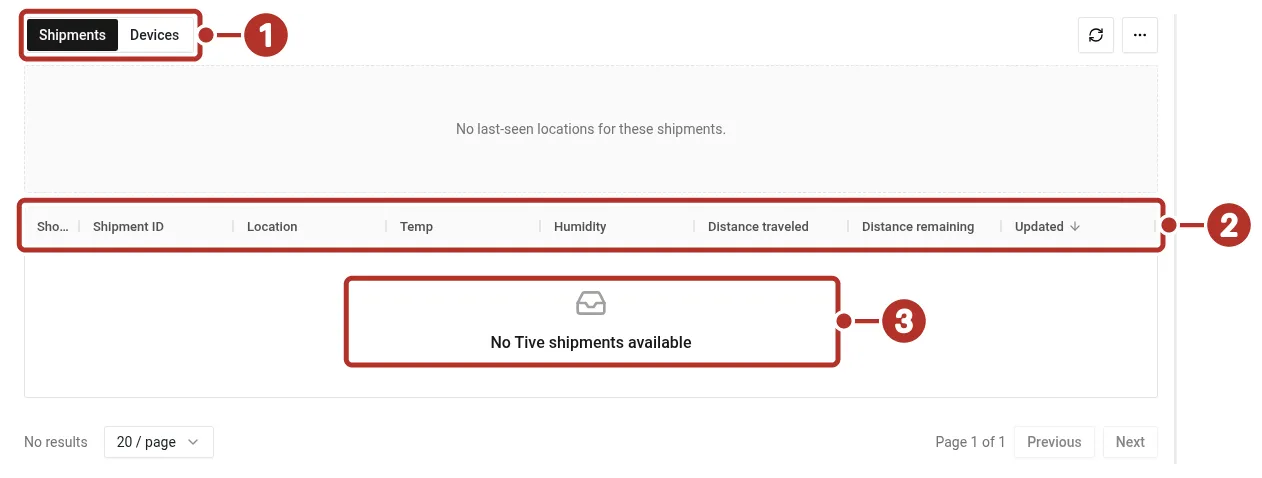
The Tive area of Tracking in an organization with no Tive shipments. 1 Shipments and Devices tabs, 2 table columns, 3 No Tive shipments available message.
Review a Tive device or shipment
Open an available device or shipment record and check its identifier, timestamps, and reported information. Tive device detail can include the current shipment, Updated time, last-seen location, and Sensors when data is available. See Battery and data for reading conditional telemetry.
A Tive shipment map offers Show History and Hide History to change the displayed view. Use the available data-point times when reviewing the path; the map does not establish how long service data is retained.
Sync from Tive
The Tive shipment map has a control labeled Sync from Tive. Where available, it requests a sync and displays a result summary. Wait for the result, review it, and check the resulting data points and timestamps. A completed request alone does not establish that there was new telemetry to display.
Review service tracking on an order
An order’s map can include Tive shipment and Reelables asset tracking sources where the corresponding records are associated with its shipment work. Use the available map settings to identify the source. Trackers on orders covers reviewing existing tracking; physical setup and association procedures are being validated separately.
Confirm setup or investigate missing records
Ask trackers@chrt.com to confirm the supported account setup and expected records for your organization. Include the service name, device or shipment identifier, and the page you checked. Do not send credentials in a support message.
An empty list, a disabled sync control, or an old timestamp has several possible causes. Confirm access, the expected service record, and the actual sync result before treating it as a hardware failure. This guide does not promise a polling schedule or arrival time for imported records.
Related guides
- Trackers on orders — shipment map sources.
- Supported devices — device records and model questions.
- Battery and data — reported sensor values.
- Tracker API — plan programmatic access.