

Managing Your Courier Network
Find the organization
Open Orgs. In Provider mode, choose Shippers 1 for customers, Executors 2 for couriers running your work, or Coordinators 3 for providers coordinating work with you. A single organization can have more than one relationship with your team. In the Shippers list, the Type column 4 shows Shipper for a customer connected on chrt and Off Platform Shipper for one that is not. The Known Shipper column shows whether each shipper is known, and its filter narrows the list by that value. Use the Company column header filter to find a shipper by name.
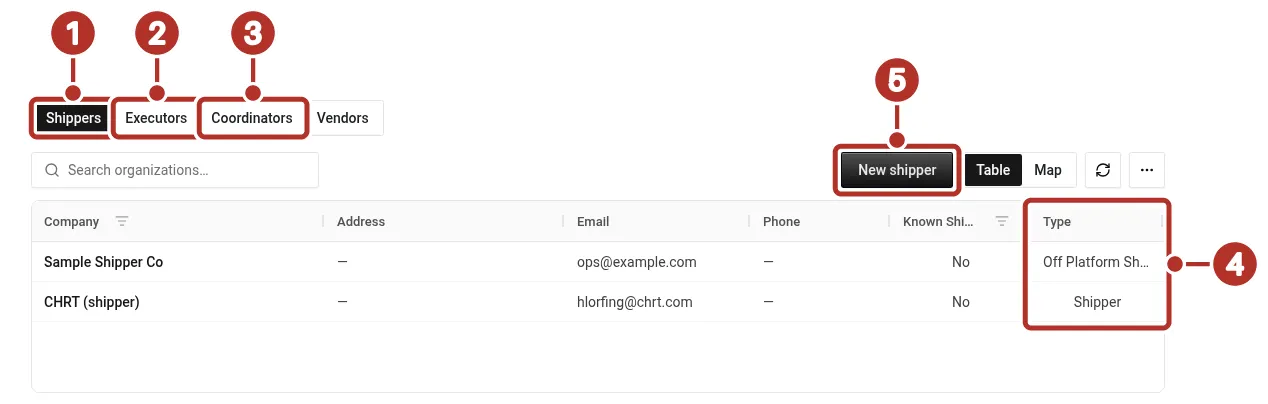
Orgs > Orgs in a provider organization, Shippers tab selected. 1 Shippers tab, for customers, 2 Executors tab, for couriers running your work, 3 Coordinators tab, for providers coordinating work with you, 4 Type column: Shipper for a customer connected on chrt, Off Platform Shipper (shown as Off Platform S…) for one that is not, 5 New shipper button.
Create the correct relationship
Choose New shipper 5, New executor, or New coordinator in the relevant list.
- For a shipper or an executor, the page asks you to choose between Connect on chrt (find an organization that already uses chrt by its handle) and Create off-platform (add one that does not use chrt yet). Choose Connect on chrt here.
- New coordinator has no choice. It opens the handle search directly.
In the handle search, enter the organization’s handle in the handle field 1, review the result card in the result area 2, and select Connect. If the organization is already connected, the card shows a disabled Connected button instead. Selecting Connect creates the connection and returns you to the list; this flow has no invitation or acceptance step. Reopen the list to confirm the saved relationship.
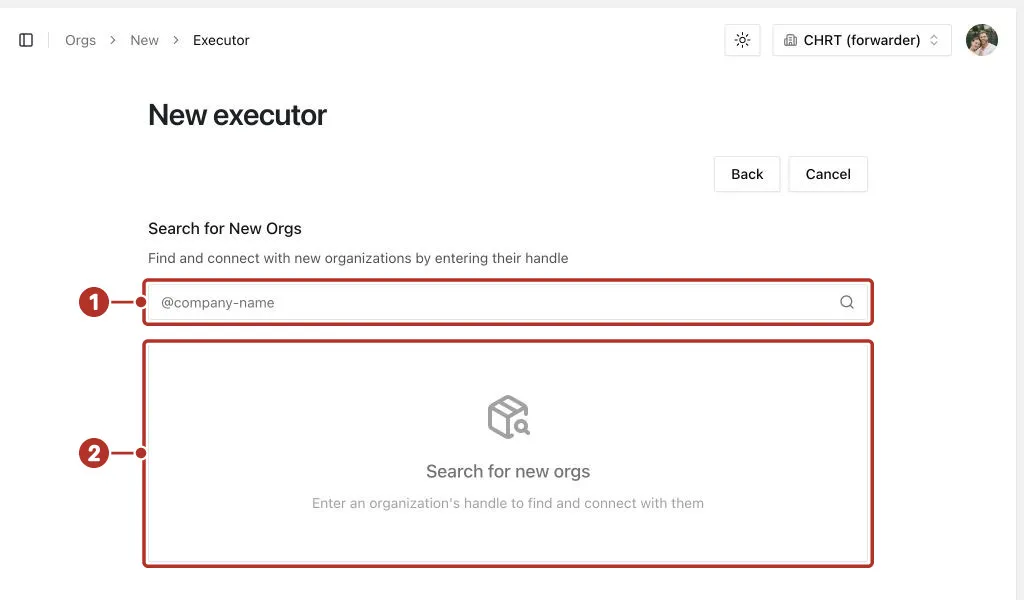
The New executor handle-search form before a handle is entered. 1 handle field for the organization’s handle, 2 result area, where the result card appears.
On the Executors tab 1, select the New executor button 2. The note under the list 3 says you can only create off-chrt connections and suggests that the other organization open your profile page and click Connect. That is a second route, started from their side; Connect on chrt starts from yours.
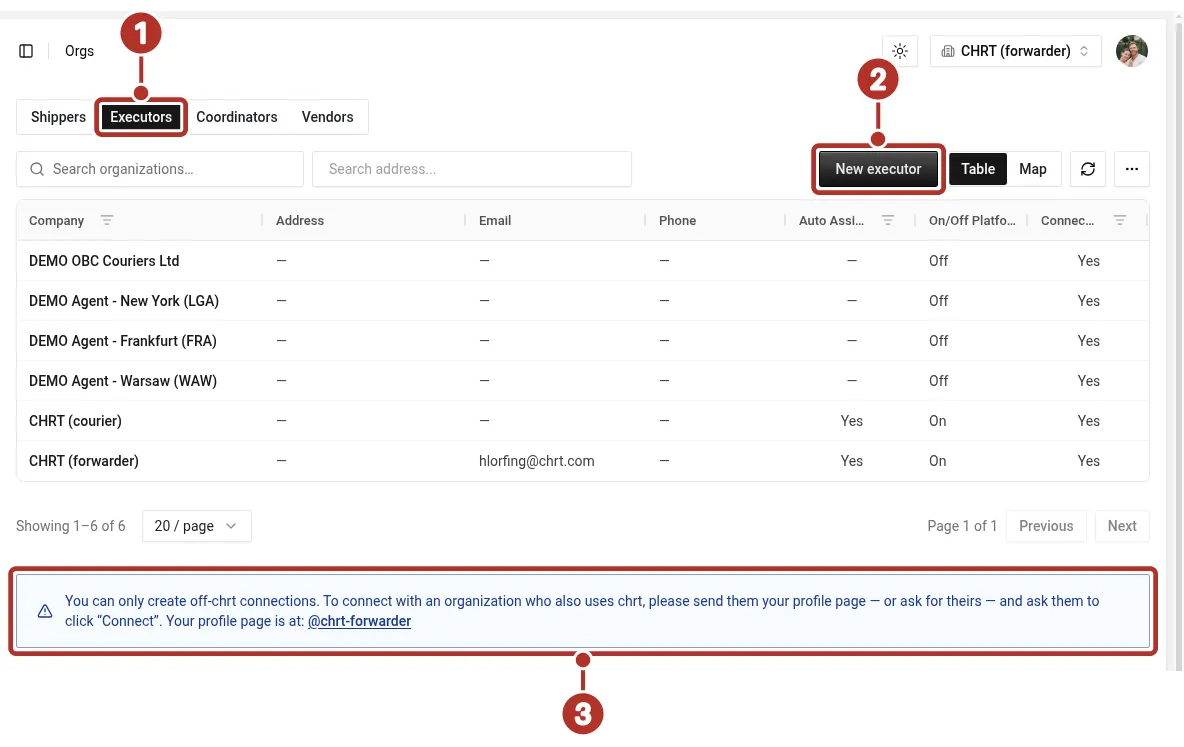
The Executors tab of Orgs in a provider organization. 1 Executors tab, 2 New executor button, 3 note under the list about off-chrt connections.
Read the connection profile
Open the saved relationship. Contact Info 1 contains the organization/contact information; Related 2 provides related records. Provider profiles also have Tax 3 and Settings 4 sections. For a shipper, the connection header shows Known or Not a known shipper, and the Settings tab has a Known shipper switch. Only an operator or higher can change that switch; other roles see it read-only. Use the actual fields available to your role, and confirm changes after reopening the profile.
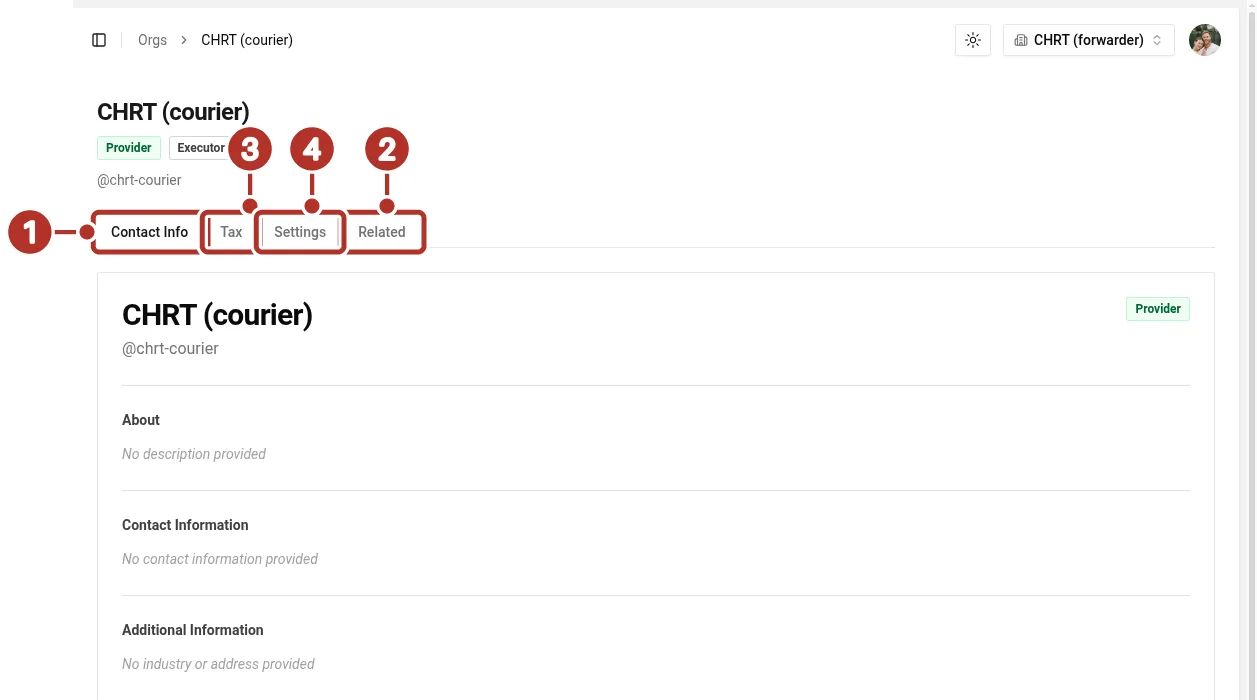
The profile of a saved executor relationship, showing the Provider and Executor badges. 1 Contact Info tab, 2 Related tab, 3 Tax tab, 4 Settings tab.
Record an off-platform partner
For a shipper or executor that does not use CHRT, choose Create off-platform on the New shipper or New executor page. Enter the Company Name (required) and, if you have them, the Business Email, Business Phone, Industry and Street Address, then choose Create Connection. Reopen the saved record. This records the partner; it does not create a CHRT login or verify that partner’s ability to receive app assignments.
Before you start
- Connecting with a courier is free and doesn’t commit you to any volume.
For billing workflows and rate configuration, see Billing.
Related guides
- Getting Started
- Multi-Leg Orders
- Flights and Air Cargo
- Courier Network
- Trackers
- Billing for forwarders — attach rate sheets per courier connection.