

Getting Started with chrt
Step-by-step help guides for the chrt onboarding checklist.
These guides help you set up the correct organization and follow the current workspace. Start with your role and the work you need to do.
In the app, the Get started with chrt card shows your setup progress 1 through steps such as Fleet 2 and Connections 3, and offers an Add customer button 4 next to a Guide link.
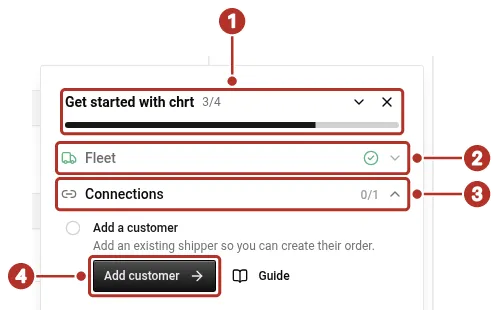
The Get started with chrt card in a provider organization. 1 progress count, 2 Fleet step, 3 Connections step, 4 Add customer button.
Account setup
- Create or select an organization.
- Choose organization type.
- Add an organization member, including driver prerequisites.
Provider setup
- Set up a rate sheet
- Add a customer.
- Create and assign an order.
- Driver app for assigned work, proof and location controls.
Shipper setup
Tracking and integrations
Review Tracking, Trackers and the SDK guide for the source and prerequisites relevant to your operation. Use the API reference for endpoint schemas and examples.
Complete each setup step in the active organization and reopen the saved result before proceeding. An invitation or draft preview is not a finished driver setup or staged order. For financial setup, use the existing billing reference; these steps do not replace that guidance.
Contact support with the organization, reference and error when something differs.