

Create Your First Shipment
Before you start
Confirm the active shipper organization and the provider coordinating the shipment. Gather cargo details, pickup and delivery locations, timing, contacts, handling instructions, and proof requirements. A connection, order reference, or draft alone does not prove that a shipment is prepared or accepted.
Create the shipment
- Open Orders and click Create Order. CHRT creates a draft and opens it on Timeline. Keep the order reference so you can return to the same draft; Orders lists drafts when Draft is included in the Status filter.
- In the order header, after by, use Select coordinator… to choose the connected provider that will coordinate the shipment.
- Build the route in Timeline and enter the items in Cargo.
- Click Stage order. If CHRT shows The order could not be staged, read the list of unmet requirements, fix each one (Go to Cargo opens Cargo) and click Stage order again.
Creating and editing a draft needs an operator role or higher, and you can edit only drafts your organization created. After staging, the coordinating provider takes the order from there.
Review the saved order
Open the order from Orders. In the shipper view, review the available Summary, Timeline, Cargo, and Messages 1. Check the status 2, journey 3, cargo 4, and coordinator 2 information shown. The map has a Progress / Live toggle 5. Ask the coordinator to correct missing details and confirm the executor and next steps.
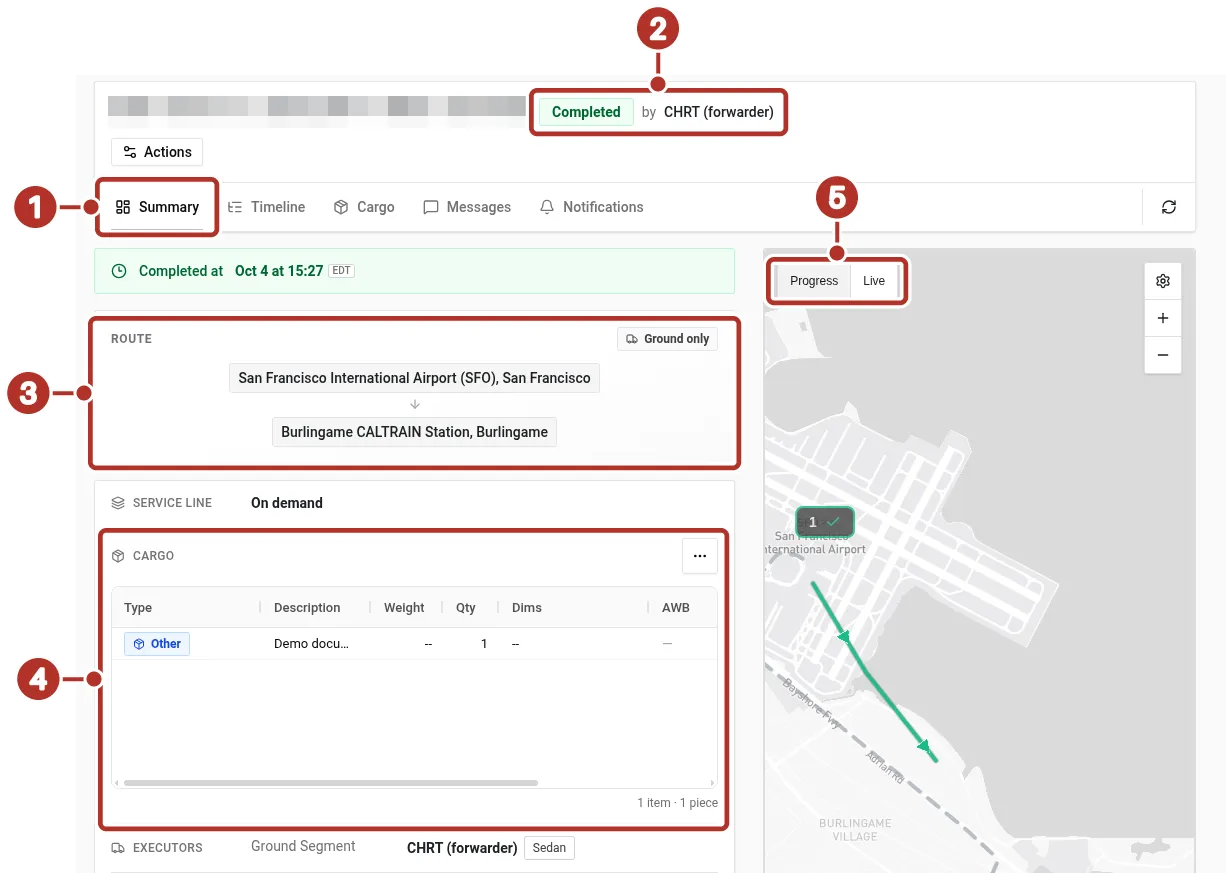
Order Summary tab in the shipper workspace, for a completed order created by the provider. 1 Summary, Timeline, Cargo and Messages tabs, 2 Completed status and the coordinator, shown as by CHRT (forwarder), 3 Route card, 4 Cargo section, 5 Progress / Live toggle on the map.
Reload the order to check the saved result. A displayed route or status does not establish a physical handoff, cargo loading, or provider acceptance; confirm those outcomes with the coordinating team and the reported events available to you.
For financial questions, use the existing billing reference.
See Connect with a provider, Creating Shipments, Orders and Tracking.