

Tracking
Tracker sessions, milestones, ETAs, and public links — how chrt knows where things are.
Tracking combines different sources. Driver location, device telemetry, flight information and task/proof events can describe different parts of a shipment; they are not interchangeable evidence.
Order tracking
Open the order and inspect its Timeline and available map/details. Check the source and timestamp for each position or event. A planned route is not a recorded journey; a last-known location can be stale.
Driver reporting depends on the mobile account, organization, sharing toggle, permissions and connectivity. See Live location. Do not assume an order status alone turns location sharing on or off.
For an order shared with a public link, a signed-out recipient sees a Live tracking page 1 with the driver’s last location on the map 3 and the coordinates and Last seen time of the last report 4. See Public Tracking Links.
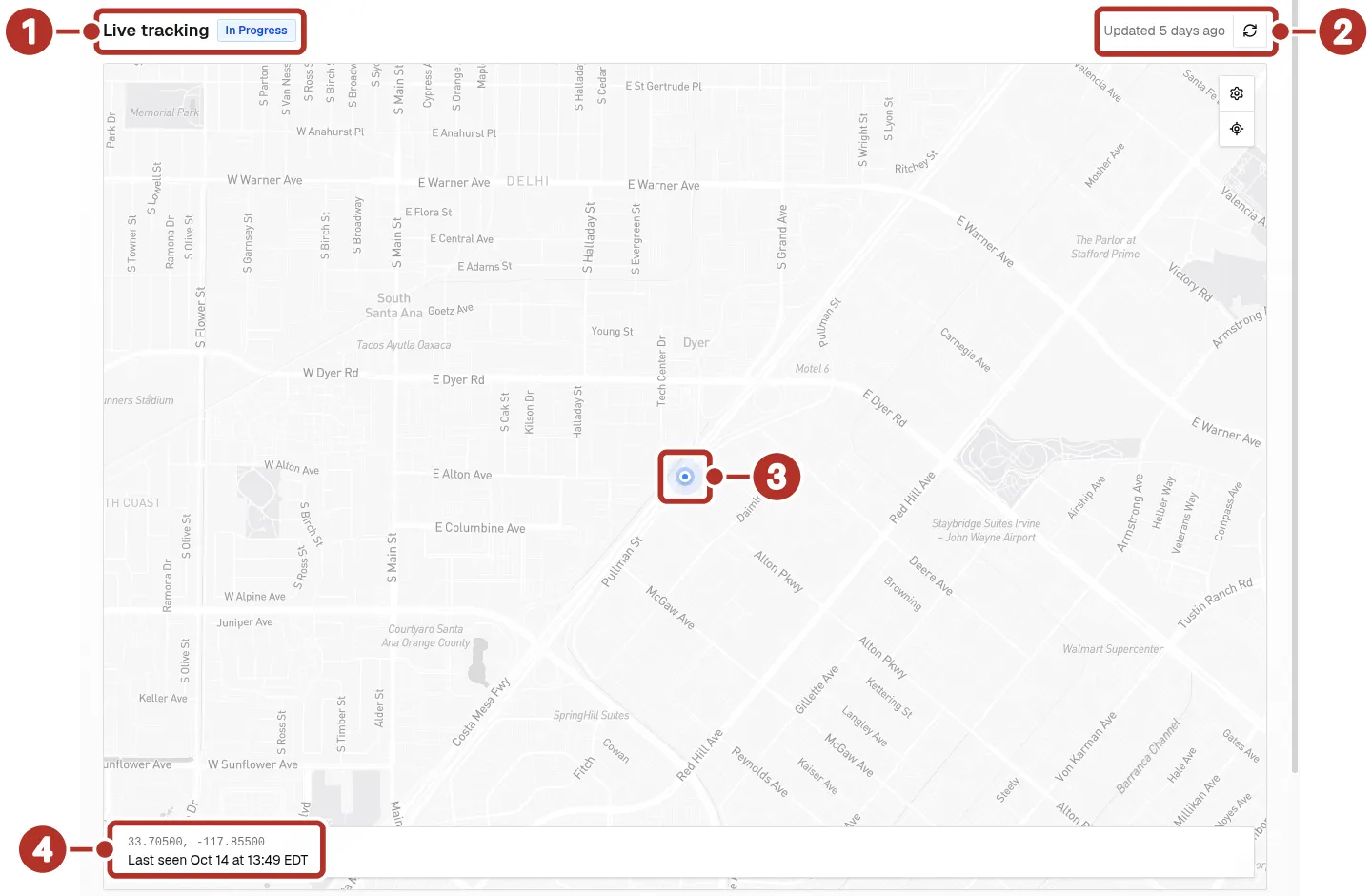
The public tracking page a recipient sees when signed out. 1 Live tracking title and In Progress status, 2 Updated age and refresh button, 3 driver location marker, 4 coordinates and Last seen bar.
Tracker session
A session organizes timestamped tracking data. A physical device must be supported, registered and configured for the intended use. For on-order visibility, check its cargo association separately. Registration or session creation does not prove a first report has arrived.
Review the actual start/end/termination settings and recorded data in the session. Do not rely on a general reporting interval or assume stopping a session erases history.
Milestones
A task event, proof record, flight update and airline cargo milestone can be different facts. Check the source establishing pickup, tender, loading, recovery or customs. A flight’s departure is not proof that the cargo was loaded.
ETA
Treat an ETA as an estimate. Review the displayed time, relevant schedule/time window and the freshness of its input. It is not proof of pickup, a guaranteed arrival or a fixed buffer contract. For flight information, read its scheduled/estimated/actual status and timezone together.
Public links
Public tracking is intended for recipients who can open a shared URL. Review the selected segments and data layers before sharing, then inspect the actual recipient view. Keep order sharing and standalone-session publication separate.
Do not assume all link types can be revoked by the same control. Stopping collection, changing sharing and deleting/requesting deletion have different outcomes; none should be described as removing all historical data without confirmation. See Public tracking, Session sharing and Security and privacy.
Confirm tracking
Check the saved assignment or device/cargo relationship, timestamp and recipient access. Contact support when expected data is absent rather than treating an enabled setting or toast as delivery evidence.