

Roles and Permissions
An organization role, organization type and driver profile answer different questions. Check all three before assuming someone can manage a page or execute an order.
Organization roles
Current application role checks distinguish Owner, Admin, Operator and Member. Owner and administrator checks govern member management. Operator-or-higher checks support operational order actions where the organization and resource permit them. Member is the least-privileged default choice for a person who needs assigned driver work.
These are workflow categories, not a complete authorization contract. A menu’s presence or absence does not prove API authorization or access to another organization’s data.
When you invite a member, the role menu lists Owner 1, Admin 2, Operator 3 and Member 4, with Member preselected.
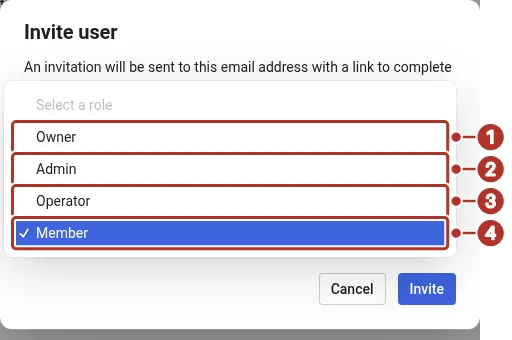
The Role menu open in the Invite user dialog on the Organization Members page. 1 Owner, 2 Admin, 3 Operator, 4 Member, preselected.
Operational access
- Member management requires owner/admin access.
- Driver assignment and operational order edits require the applicable provider role and resource access.
- Notification-group management uses owner/admin checks rather than the broader operator group.
- Profile, driver and contact changes can also depend on the resource’s owner or the current user’s identity.
Use the lowest role that enables the person’s actual work. Recheck access after changing organization or role.
Drivers
A driver is a profile linked to a user in an eligible organization, not a fifth membership role. An invitation, a Member role or successful sign-in alone does not prove the profile exists. A driver may hold another organization role as well.
Invite the correct account, confirm the organization’s driver profile and assignment, then have the person check the mobile app’s active organization and available tabs. See Add an organization member and Install the driver app.
Organization type
Shipper and Provider describe how the organization uses chrt. Couriers and forwarders use Provider workflows. The active type and a user’s role jointly affect the available work. The setup screen says This selection is permanent for your organization. Do not assume every operation follows from the role hierarchy.
For billing workflows, use the existing billing guide. Check the actual resource access rather than relying on a universal role matrix.